Free
The whole loop, free — one gated app, forever.
$0
forever
- One gated app
- Bridge sync
- Stats
- Week pass
- Emergency pass
Live on the App Store
Get FareGateFor USMLE med students running AnKing and AnkiHub.
FareGate turns that reach into the fare: your real Anki reviews unlock your apps.
Works through the FareGate bridge. Independent — not affiliated with Ankitects, AnKing, or AnkiHub.
“Another blocker? I've deleted three this year.”
Delay is easy to delete. Three apps in, the feed is still there.
A fare is different: the toll is your own studying, written back to your real collection.
The gate never argues and never lectures. It holds its price, and the price is worth paying.
Walls fall. Turnstiles hold.
FareGate arrives with a starter deck — five real cards, no account, no setup. 60 seconds and you've run the whole loop: gate, fare, open.
Pick them in the system picker; FareGate never learns their names. Open one and the fare is due: 10 cards buys 15 minutes, reviewed right there.
Pair once with desktop Anki by entering a code. After that, your reviews sync back when you open desktop Anki and after each desktop sync; your AnKing deck and AnkiHub keep working as they do today.
Faithful rendering is the whole product: your cards, not a flattened clone. So the renderer is measured against Anki itself, and the measurements are kept.
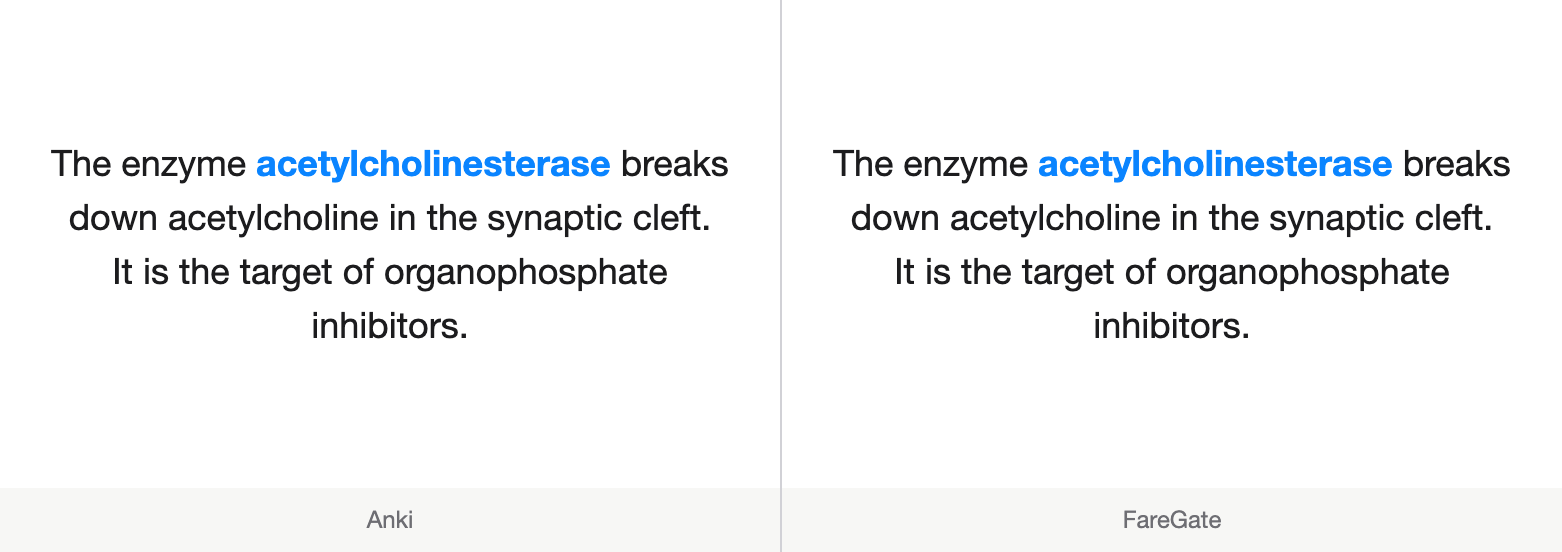
The desktop bridge is AGPL open source — the add-on that runs inside your Anki is yours to read.
Free
The whole loop, free — one gated app, forever.
$0
forever
Pro Annual
$34.99/year
about $2.92/month
Runs next to UWorld and AnkiHub on your board-prep shelf —
Renews annually until canceled.
7-day free trial, then $34.99/year.
Monthly — $4.99/month. 7-day free trial, then $4.99/month.
Why it costs money: the bridge, sync, and a full in-gate renderer and scheduler are ongoing work. The Free tier is a real product, forever — nothing free ever moves behind the paywall.
When a trial or subscription ends, FareGate quietly reverts to Free. No nagging emails, no reminders piling up — it just ends.
For USMLE med students running AnKing and AnkiHub.
If you want a gate with no pass, you want a jailer. We're not it. The pass always exists.
If you don't run Anki yet, FareGate has nothing to gate. Cards are authored in desktop Anki.
You don't make them here. Desktop Anki stays your editor: the mothership. FareGate leaves card content and media alone. It returns the grade and review time through Anki's scheduler API, which updates scheduling in your collection.
One pairing code, once. After that, reviews sync back when you open desktop Anki and after each desktop sync. The gate itself is offline-first: reviews queue locally, so no spinner ever stands between you and your cards.
The others sell delay; the fare here is your own real studying. The gate holds because the toll is worth paying, not just hard to dodge. We won't claim it's unbeatable; we claim it's worth beating less.
Fair question. The money funds the bridge, sync, and upkeep of a full in-gate renderer and scheduler — the part nobody else built. The Free tier is a real product, forever, and nothing free ever moves behind the paywall.
The emergency pass always exists — press and hold, and you're through. It shows in your own week's stats, seen by you and judged by no one. A turnstile, never a cell.
No. Fare is paid forward, never owed — there's no debt display, no red badges, no guilt notifications.
Yes — that's the beachhead. FareGate leaves card content and media alone. It returns the grade and review time through Anki's scheduler API, which updates scheduling in your collection. Your subscription, your deck, and your protected cards stay exactly theirs. Standard Anki template filters render natively; unknown add-on filters pass through to the card's own HTML and JavaScript.
iPhone first. A native Mac app — the same turnstile in your menu bar, the same keys as Anki — is in the works, to gate the desktop where the other half of the leak lives. One grammar, both machines, when it's ready.
No. FareGate is an independent app that works with your Anki collection. Anki is a registered trademark of Ankitects Pty Ltd; we're not affiliated with or endorsed by them.
An iPhone on iOS 18 or later, paired once with desktop Anki on macOS or Windows. A native Mac gate app is in the works.
In desktop Anki, choose Tools → Add-ons → Get Add-ons… and enter the code 29632925 (the bridge on AnkiWeb), then restart Anki. Prefer a file? Download the add-on and use Tools → Add-ons → Install from File…. Either way, finish by choosing Tools → FareGate: Pair with phone… and entering the code from your iPhone. Tested with Anki 26.5. The bridge is open source under the GNU Affero General Public License (AGPL); download the source.
Not yet. FareGate is iPhone-first; Android and AnkiDroid support isn't here. If that's you, leave your email below and we'll tell you when it changes.
Cancel anytime in your Apple subscription settings; the plan runs to the end of the period you paid for. Refunds are handled by Apple through the App Store.
With the bridge, your truth already lives in desktop Anki. The bridge is AGPL open source, and your reviews are ordinary entries in your own collection — canceling keeps everything there. A standalone collection stays on your device.
Yes. The gate is offline-first: your due cards are cached locally, so you can pay the fare with no connection. Once you're back online, reviews sync back when you open desktop Anki and after each desktop sync.